
Server farms
A server farm is a group of your servers that share access keys: a key works on every server of its farm. The farm also decides the certificate its keys carry and the settings its servers run with.
Where to find them
Open Server Farms. Every project starts with one farm, Server Farm 1, and it is all you need until some servers need keys of their own. The list shows each farm's server profile, how many servers it has, and how many of its keys apps used in the last seven days.
Select a farm to open its page. Its settings are under Server Farm, and its certificates under SSL / TLS Certificates, as SSL/TLS certificates explains.
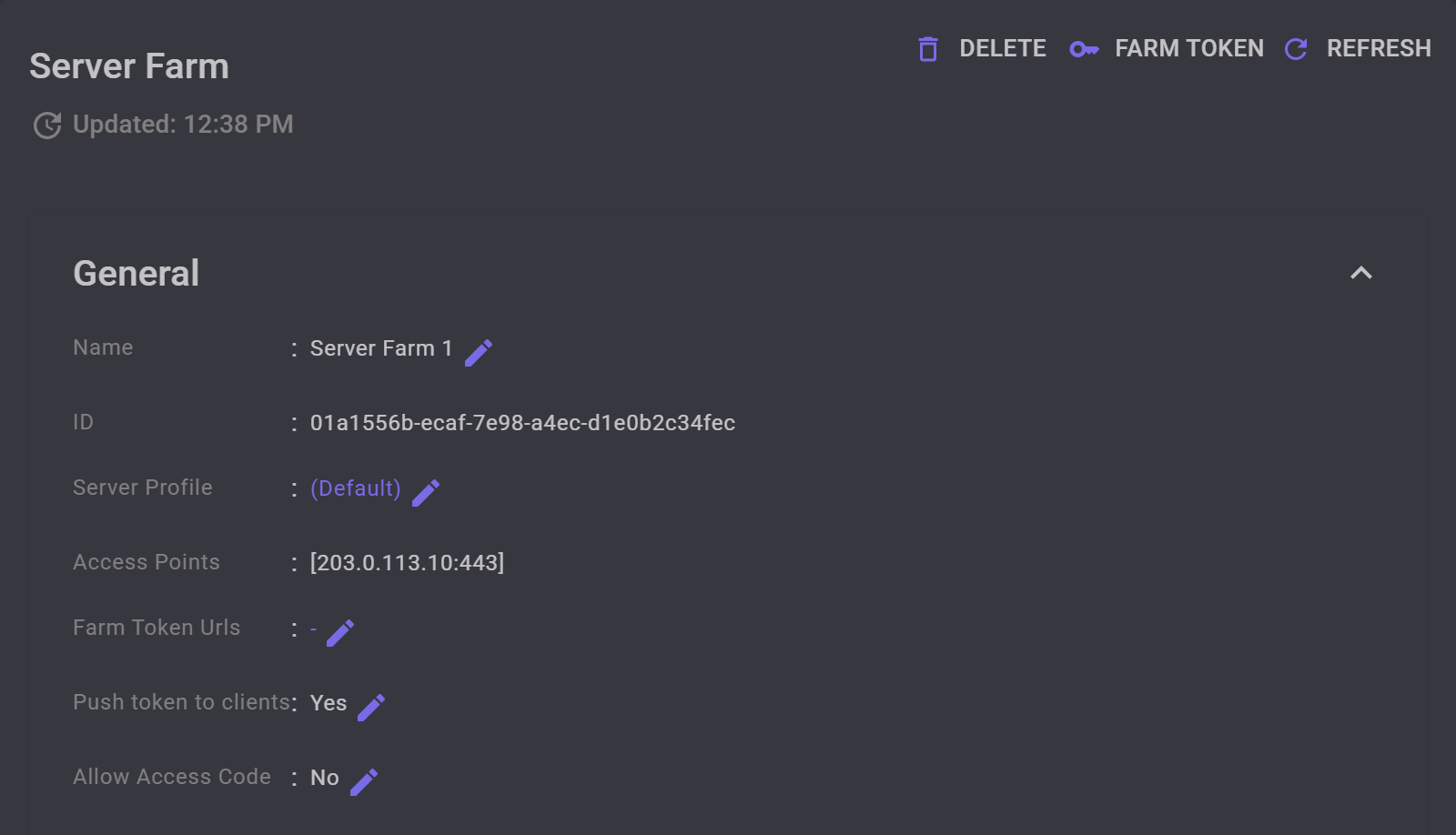
203.0.113.10, and Push token to clients is on.
When to add a farm
A key works only on the servers of its farm. Add a farm for servers whose users should not reach your other servers, or for servers that need their own domain or settings: a farm's keys carry one certificate, and its servers share one server profile.
Create a farm
Open Server Farms, select Add, name the farm and select OK. MANAGER opens the new farm's page.
A new farm uses the project's default server profile, has Push token to clients on, and has a self-signed certificate with a made-up name, which its keys carry until you use your own domain.
It cannot give out keys until it has a server: MANAGER builds the keys from its servers' addresses. Until one of them is installed, the farm's page shows a red message under its name.
Its servers
Every server belongs to one farm. When you add a server, choose its Server Farm; the field appears once the project has more than one farm.
To move a server to another farm, open the server and edit its Server Farm. It takes on the new farm's certificate and server profile, and the old farm's keys stop working on it. MANAGER refuses the move while the server has certificates of its own: delete them first.
If it was the old farm's only server with an address in the keys, the old farm's keys reach no server until another of its servers has one.
Its keys
Every access key belongs to one farm and works on all of its servers. Choose the farm as you create the key under Access Tokens; the field appears once the project has more than one farm.
A key carries what apps need to reach the farm: the addresses of its servers that go in the keys, and its certificate's domain and fingerprint. The farm's Access Points shows them. Access points decides which addresses go in, and SSL/TLS certificates which certificate.
A key moved to another farm, by editing its Server Farm, stops working on the old farm's servers, and MANAGER cannot update it there: give it to its users again.
Push token to clients
A key holds the addresses and the certificate its farm had when you copied it. With Push token to clients, on the farm's page, MANAGER gives each app the farm's current ones as the app connects, so apps catch up after a change without new keys from you. It is on for every new farm.
MANAGER sends the new key only while every server whose address is in the keys is up, so apps get only addresses that already work. A key with no address, only a domain, as behind a reverse proxy, does not wait.
An app gets the new key only by connecting with the one it has. So after a change, keep the old address or certificate for a few days, as Change an address shows, or give the farm token URLs.
Farm token URLs
A farm token URL is a file on the web where MANAGER publishes the farm's current addresses and certificate, encrypted so that only the farm's keys can read them. Every key of the farm carries the URLs, and an app that cannot connect reads them and tries again with what it finds, even when every address it knew is gone or blocked.
On the farm's page, select Farm Token Urls, then Add. Publish Url is where apps read the file: on a site or a CDN your users can reach. Give it a Name, and choose how the file gets there with Auto Upload:
- Off: you put the file there yourself. Select Farm Token on the farm's page and Download it, and do so again after every change.
- POST, PUT or PUT & POST: MANAGER uploads the file after every change, with the request that File Url and the fields around it describe. For a file in a GitHub, GitLab or Bitbucket repository, MANAGER fills them in from Publish Url, and you add only an Access Token that can write the file.
The list shows whether each file holds the farm's current token. The file may be cached, so check again a few minutes after a change.
Keys carry the URLs the farm had when you copied them, so add the URLs before you give out keys. Apps holding an older key get them through Push token to clients.
Rename or delete a farm
To rename a farm, edit its Name. To delete it, select Delete on its page: MANAGER deletes its keys with it, and the confirmation says how many. A farm with servers cannot be deleted: move them to another farm, or delete them, first.


