
Put your server behind a reverse proxy
A network that blocks your server's IP address cannot stop apps that do not connect to it. Behind a reverse proxy such as Cloudflare, apps connect to the proxy, and the proxy passes the connection on to your server.

How it works
Your domain leads to the proxy instead of your server. Apps look the domain up and connect to the proxy, which decrypts the connection, as it does for any website it serves, and encrypts it again toward your server. Their traffic goes over WebSocket, which Cloudflare passes on. Another reverse proxy works too, if it passes WebSocket on and reaches your server over TLS.
Apps look the domain up only if their key carries it as a trusted name, which takes a certificate from a certificate authority.
A key can carry your server's own address as well. Apps then connect either way: the proxy keeps them connected if the address is blocked, but anyone holding the key can read the address. A key without your server's address sends every app through the proxy.
What to keep in mind
- Blocking: A network can still block the reverse proxy's addresses, or your domain. Cloudflare's addresses serve many other websites, though, so blocking them has a cost.
- DNS: Apps look your domain up through the network's DNS before they connect. If the network blocks or falsifies the answer, apps fall back to the addresses in their key, so a key that carries only the domain cannot connect.
- Privacy: The reverse proxy sees what is inside the tunnel, just as your server does: where your users connect, and anything they send unencrypted. Their HTTPS stays encrypted. Use a reverse proxy you trust.
- TCP only: Your server does not offer its UDP and QUIC ports to apps that come through the proxy.
- Terms: Check that your provider's terms allow VPN traffic. A small group of users, around 50 or fewer, is usually fine.
Before you start
- A domain or a subdomain, with a certificate from a certificate authority on your server: Use a domain name and a trusted certificate shows how. Do that first, while the domain's record still points straight at the server.
- A single server behind the domain. Records that lead to two servers can send the connections of one session to both, and the session breaks.
- The server listening on TCP port
443, or on another port the proxy passes on. Cloudflare passes HTTPS on443, 2053, 2083, 2087, 2096, 8443only.
Turn the proxy on
- In Cloudflare, open your domain's DNS records and set the one that points at your server to Proxied, and its AAAA record too if it has one.
- Under SSL/TLS, set the encryption mode to Full (strict). Cloudflare then reaches your server over TLS and checks its certificate. In Flexible mode it would use plain HTTP, which the server does not accept.
VpnHood! MANAGER renews its certificates over plain HTTP on TCP port 80, through the domain, and Cloudflare passes that on to your server. On a managed server, leave Always Use HTTPS off: it would redirect the request to HTTPS, and the renewal would fail.
On a managed server
Check the farm's certificate for the domain: under Signature it reads CA Signed, and its Visibility is PublicInToken. Keys then carry the domain, and apps look it up.
To send every app through the proxy, take the server's own addresses out of the keys, in the server's Access Points:
- Turn Automatic Configuration off.
- Edit each address, and set its Mode to Private.
- Leave its Listen at Yes, so the server keeps listening: the proxy still connects to it.
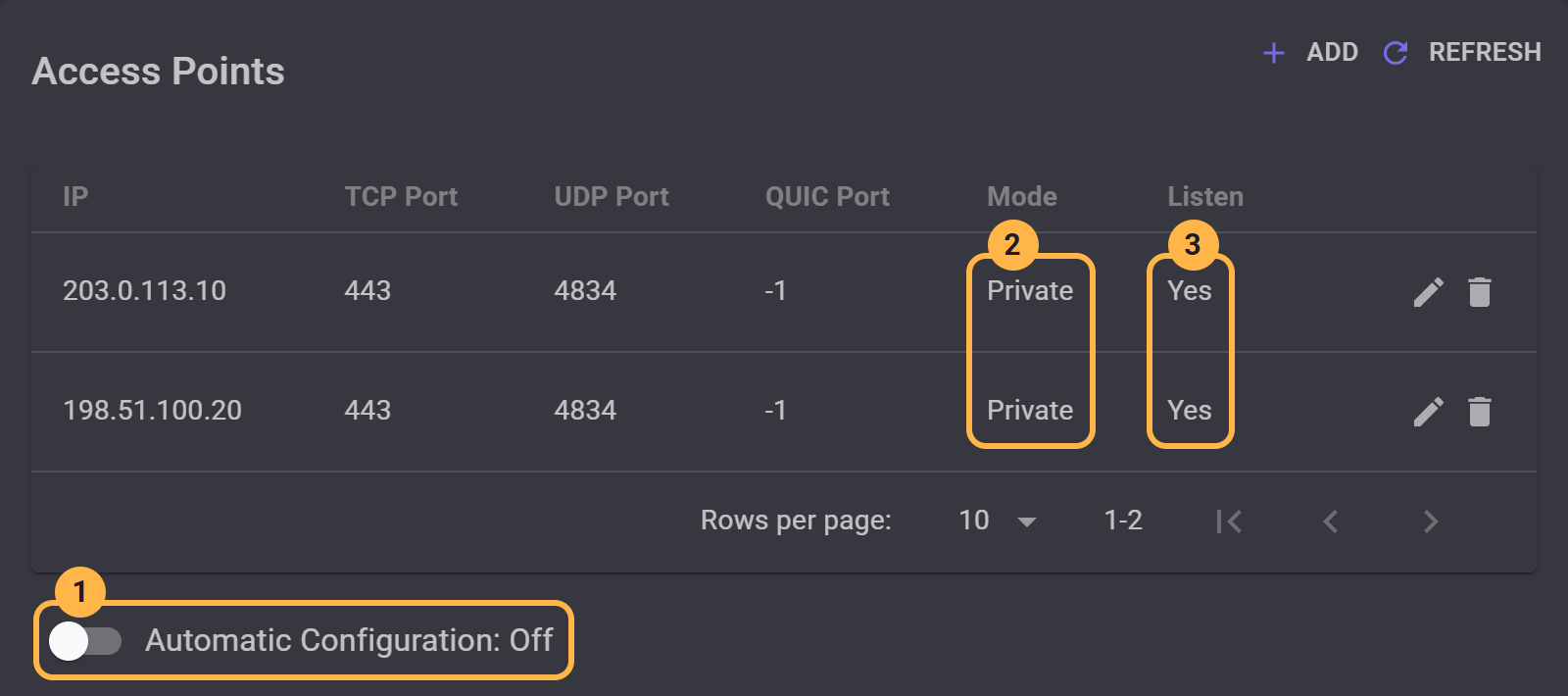
MANAGER allows keys without an address only while the certificate reads CA Signed. Set your server's IP addresses explains each setting.
Left at PublicInToken, the addresses stay in the keys, and apps use them and the proxy alike. The proxy then keeps your users connected when an address is blocked.
Apps holding an older key get the new one the next time they connect, as Push token to clients is on by default.
The domain leads to one server, so in a farm of several servers, every app that comes through the proxy reaches the same one.
On a standalone server
Check that the server uses the domain's certificate, with IsValidHostName set to true: Use a domain name and a trusted certificate shows how. Keys made since then carry the domain, and apps look it up.
A standalone server always puts its own addresses in its keys, beside the domain, so apps use them and the proxy alike. The proxy keeps your users connected when an address is blocked, but anyone holding a key can read the address.


