
Feature
Smart Proxies
When the direct route to your server is blocked, VpnHood! can go through a proxy instead. The tunnel is the same, only the road changes. Give the app a list of SOCKS or HTTP proxies and it takes over from there: it tests them in parallel, learns which ones are reliable, rotates through the best and keeps the list fresh on its own.
Available on Android, iOS, Windows and Linux
- SOCKS4
- SOCKS5
- HTTP
- HTTPS
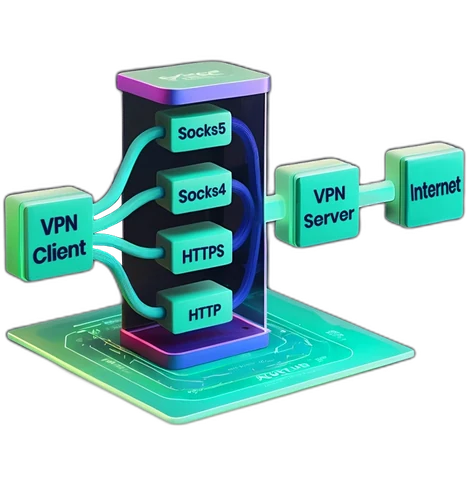
From a messy list to a working connection
A plain proxy setting asks you to find a working proxy and babysit it. VpnHood! turns the whole list into something that looks after itself.
-
Paste anything
Full URLs, host and port pairs, or a raw text dump. The app picks out every proxy and works out the protocol from the text or the port.
-
Tested in parallel
Dozens of proxies are checked at once, each with a real connection and a TLS handshake, so a proxy that only answers a ping never counts as good.
-
Rated as it learns
Every proxy earns a rating from its successes, failures and speed. Slow ones lose points, fast ones climb.
-
Rotated, not hammered
Connections are spread across the healthy proxies. One that fails goes to the back of the queue and is rechecked before it is trusted again.
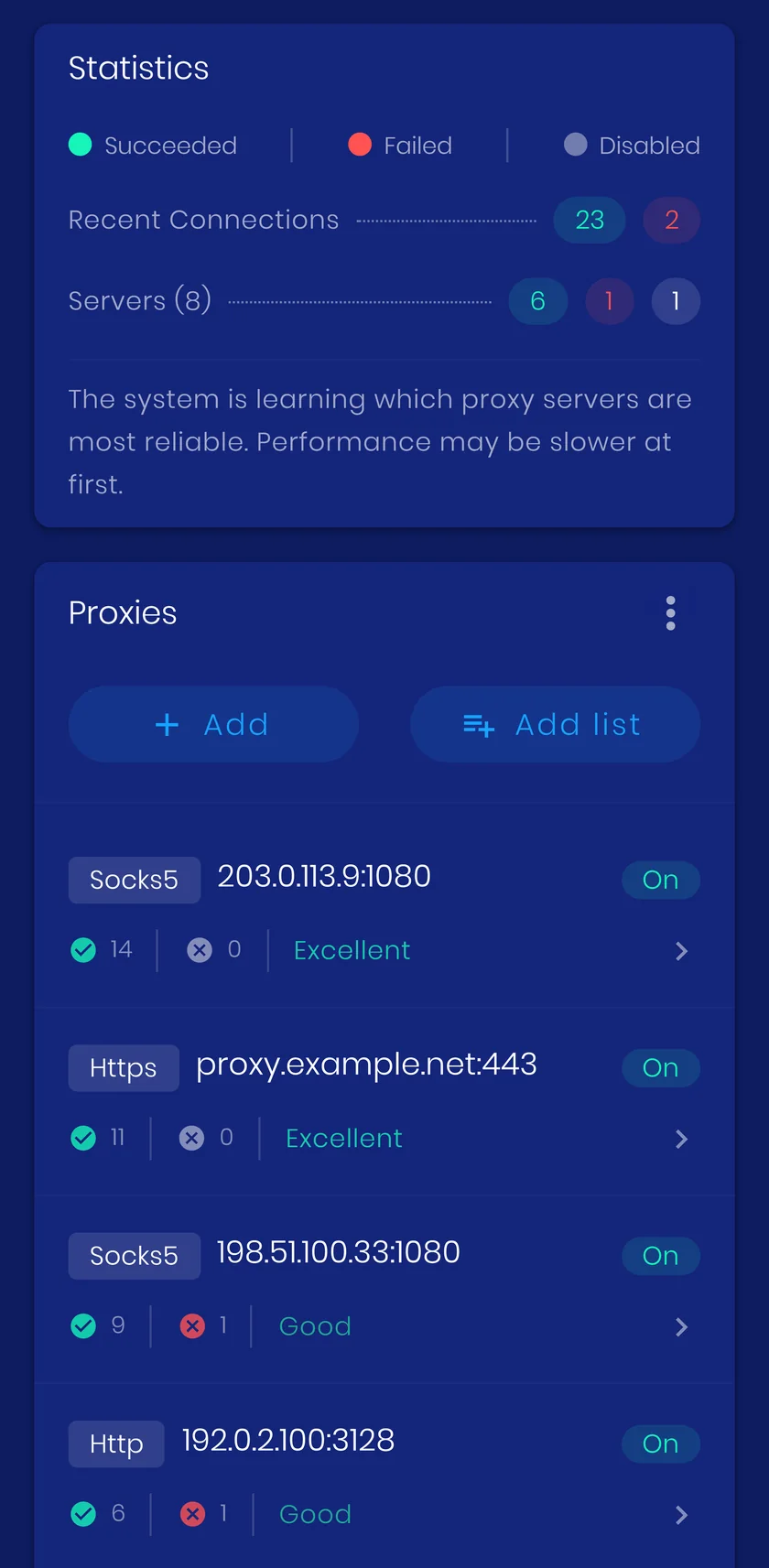
Why it beats a plain proxy
A proxy on its own is a gamble: it sees your traffic, it changes your address, and it dies without warning. Inside the VpnHood! tunnel a proxy is only a relay, and the app makes that relay dependable.
-
One address, whatever the proxy
Your traffic leaves from the VpnHood! server, not from the proxy. Rotate through ten proxies and websites still see one steady address: no surprise logouts, no fresh captchas, no sessions dropped because your IP jumped.
-
Proxies see nothing
Each proxy carries only an encrypted, server-authenticated connection to your VpnHood! server. It cannot see which sites you visit, read what you send, or alter it. A proxy from a public list cannot make that promise on its own.
-
Several proxies at once
The tunnel runs over several connections, and each one can take a different proxy. Your traffic is spread across the healthy proxies, so no single one becomes the bottleneck or the single point of failure.
-
Settles once it has learned
Checking stops as soon as enough good proxies are known, and reconnects lean on the proxies that have already worked in this session. After the learning phase the list goes quiet and the connection stays put.
-
Fails loudly, not silently
Before connecting, the app checks the list. If none of the proxies can reach the server, it tells you right away instead of hanging on a dead relay while you wonder what went wrong.
-
Everything in plain sight
Successes, failures, latency and a quality rating for every proxy, plus a live tally for the session. You can see exactly why the app prefers one proxy over another.
The score behind every proxy
Each proxy carries a penalty. A failed connection costs more than a slow answer, and every good answer earns some of it back. The app always tries the lowest penalty first, so the list sorts itself while you use it, and you can see the rating of each proxy in the app.
Refreshed automatically
Point the app at a proxy list URL and it downloads the list again on a schedule, merging new entries while keeping what it has learned about the old ones.
Remembered between sessions
Ratings survive restarts, so the app goes straight to a known good proxy on the next launch. One tap resets them when you want a fresh start.
Where to get a list
VpnHood! does not ship proxies, and it does not need a curated list. Point it at any public SOCKS or HTTP list and the app sorts it out: it tests every entry, keeps the ones that answer and ignores the rest. You do not have to trust them either, because what travels through a proxy is an encrypted tunnel it cannot read.
A list to start with
Proxifly publishes a free list that refreshes every few minutes and writes the protocol into every line, which is what the importer wants. Paste this into Auto update and choose an interval.
https://raw.githubusercontent.com/proxifly/free-proxy-list/main/proxies/all/data.txt
Check the protocol prefix
A line like socks5://198.51.100.7:1080 leaves nothing to guess. A bare 198.51.100.7:1080 does: the app reads SOCKS5 from ports 1080, 1081 and 9050, HTTPS from 443, and treats everything else as HTTP. So a SOCKS list published as bare addresses on other ports imports with the wrong protocol, and every entry fails.
A widely used list in that bare format: TheSpeedX/PROXY-List (opens in new tab)
These lists are kept by other people. We do not run them, check them or promise that any particular proxy works. Note too that raw.githubusercontent.com is itself blocked in some of the places proxies are needed most, so if the app cannot fetch the URL, open the list where access is clear and paste the text in by hand.
How it works
A proxy is a relay, not a replacement for the VPN. The app builds its usual encrypted tunnel to your VpnHood! server and hands it to a proxy first: the app connects to the proxy, the proxy connects to the server, and the proxy never sees what is inside. On networks that block the server address outright, that extra hop gets you in. SOCKS4, SOCKS5, HTTP and HTTPS proxies are supported, and on Android and Windows the app can also use the proxy already configured on the device.
When to turn it on
When the server itself is unreachable rather than merely inspected. If a network blocks the server address, a proxy gives the connection another way in.
What it costs you
SOCKS and HTTP proxies carry their own fingerprint and can be blocked easily by firewalls, so a proxy is a way in rather than a way to go unnoticed. Cloak Mode is the stealth tool.


